
One moment, your MacBook Air is a flawless window into your ideas, creativity and projects. And the next second, the screen has a network of cracks that blurs the view. Or what if the display starts flickering. The signature slim Mac display design, once you loved, now feels vulnerable. The only thing on your mind right now is to look for precise and reliable MacBook Air screen repair M1 and M2 solutions.
Before choosing the right repair solutions, make sure to know the exact problem why your screen suddenly appears cracky or turns black out of nowhere. Next, compare your budget options and check the MacBook Air screen repair cost. This guide has everything you must know so you can confidently choose the right shop for fixing your Apple Silicon Laptop.
What Common MacBook Air M1 and M2 Screen Issues People Complain All the Time?
First and foremost, make sure to diagnose the problem before jumping into instant solutions. Although the symptoms might look similar. Their causes might differ. Identifying the right display problem is the first step to a professional MacBook Air screen repair.
Visible Physical Damage
- MacBook Air Screen Glass Cracked: This is the most obvious sign. A cracked glass screen issue begins from a single hairline crack and turns into a full spider-web pattern in no time.
- MacBook Air Screen Lines: You might see vertical or horizontal lines of color, static, or blank spaces. These lines indicate a damaged LCD panel or a loose connection, which can be fixed with a MacBook Air LCD replacement service.
Internal or Functional Issues
- MacBook Air Screen Flickering Problem: The display may vibrate, flash, or flicker inconsistently. This is a common complaint with Apple Silicon MacBook display issues.
- MacBook Air Black Screen Issue: The screen is completely dark. But you might hear the fans or see the keyboard backlight on. This is also known as the M2 MacBook Air screen suddenly black or M1 MacBook Air display not working error.
- MacBook Air Backlight Failure: The screen is very dim or has dark spots. You can faintly see the content when you shine a light on it, indicating the LCD is working, but the backlight is not.
Don’t Ignore these Early Apple Display Warning Signs
Major failures often begin with small problems. Watch for intermittent flickering, slight discoloration, or slow response time when the display no longer works. If you notice any of these MacBook Air screen damage symptoms, back up your data immediately:
- Intermittent flickering that disappears once you adjust the screen angle.
- A slight discoloration/yellowish tint in one area.
- Touchpad or keyboard responds slowly when the display malfunctions (potentially a motherboard issue affecting the display circuit).
Why M1 and M2 Screen Repairs Are So Different?
The M1 and M2 MacBook Air Retina display repair isn’t the same as fixing older Intel models. This hugely impacts the overall cost and repair process.
-
Integrated Design
The display assembly is incredibly thin and fused. The MacBook Air LCD replacement typically involves replacing the entire top lid setup, including glass, LCD, backlight, and often the bezel, as a single unit.
-
Proprietary Components
These screens are specifically calibrated for Apple Silicon chips. Non-genuine parts can lead to color inaccuracy, brightness problems, and even compatibility errors.
-
System Integrity
The display is tied to the T2 security chip (in M1) and system firmware. A professional repair guarantees all components work simultaneously, preserving the True Tone features.
Screen Repair vs. Screen Replacement: What is the Right Option for You?
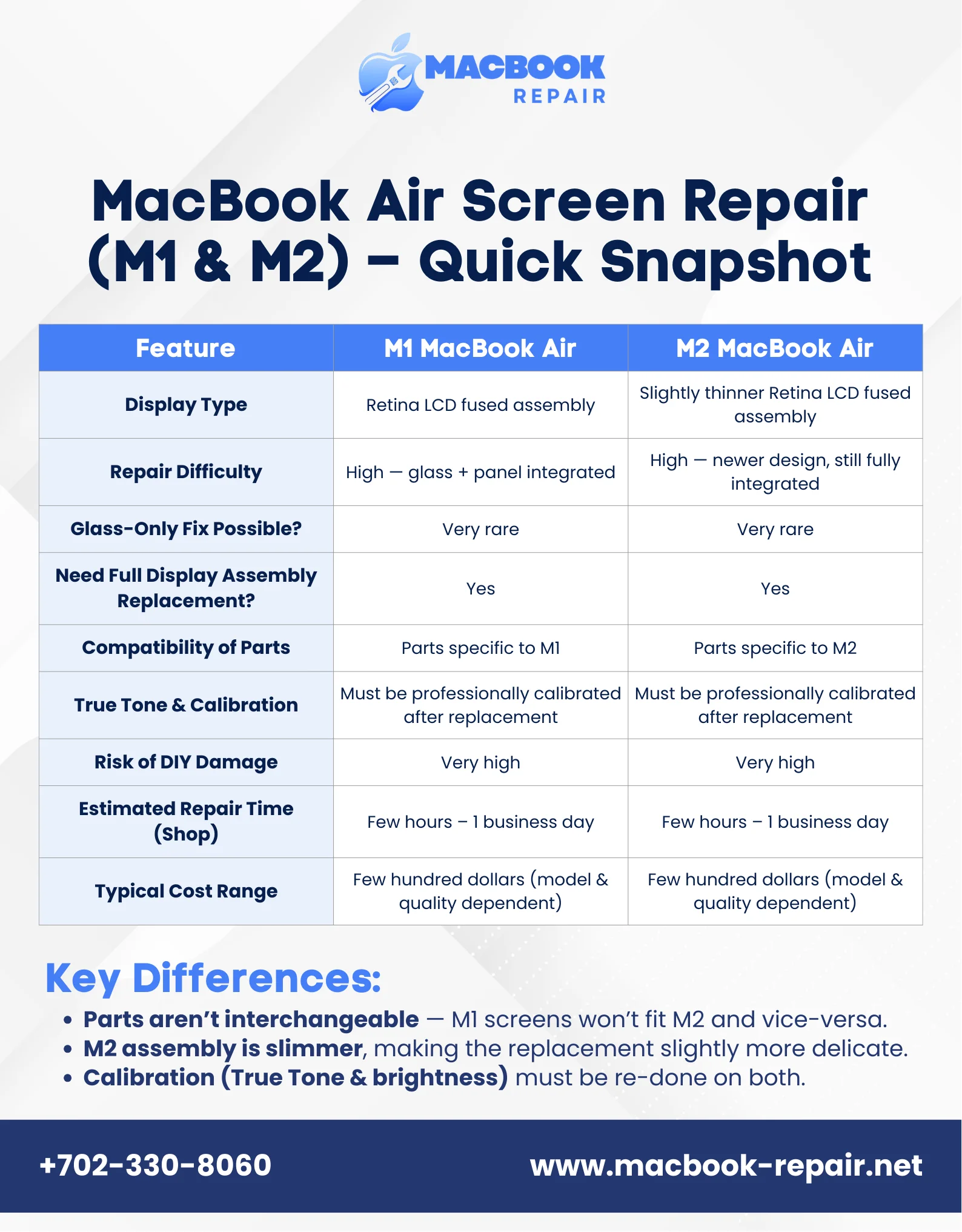
For most physical damage or internal faults, a full MacBook Air panel replacement is necessary. The term “MacBook Air cracked screen fix” typically refers to replacing the entire display assembly. In comparison, minor repairs on the outer glass are exceptionally rare. Ultimately, making the repair riskier on these models due to the fused layers.
Current MacBook Air Screen Repair Cost in Las Vegas
The MacBook Air M2 screen replacement cost (or for the M1) depends on your model, whether parts are genuine, and the service fee. It is a worthy investment. Getting an affordable professional service with your exact model details is the best way to receive an accurate price before you book. The screen replacement cost depends on several factors:
- Model Specification: An M2 13-inch screen may be more expensive than an M1 13-inch or an M2 15-inch model.
- Genuine vs. Fake Parts: Genuine Apple parts are more expensive but guarantee quality and longevity.
- Labor & Expertise: The complexity of the repair depends on professional service and the technician’s expertise.
While we can’t list exact prices that change over time, you can expect a professional MacBook Air screen repair for an M1/M2 model to range up to a few hundred dollars.
Why Never Try A DIY MacBook Air Display Repair?
Sometimes, people do not have any knowledge about tech gadgets and their complex assembling. But out of curiosity, they randomly follow YouTube DIY mac repair guides to avoid paying for the repair service. Do not pull this stunt ever in your life! The parts are extremely fragile. You can easily worsen the MacBook Air display cable issue.
A DIY fix voids your warranty terms and conditions. A mistake can turn a simple MacBook repair into a much costlier problem. Though it seems very exciting to watch a tutorial and try a DIY MacBook Air display repair. We strongly advise against it for these reasons:
- Fragile Parts:The display assembly and the cables connecting it are incredibly fragile. One wrong move can turn a display cable issue into a totalMacBook Air backlight failure.
- Voided Warranty: Opening your MacBook Air often voids any remaining Apple warranty.
- No Guarantees: You bear full responsibility if something goes wrong. A messed up repair can lead to higher costs than the original problem.
How The Professional MacBook Air Screen Repair Process Works?
Knowing what to expect can provide peace of mind. A reputable technician will follow a process like this:
- Diagnosis: Firstly, the technician confirms the exact issue. Whether it’s the panel, cable, or logic board.
- Sourcing: Next, using a high-quality, compatible display assembly.
- Precision Repair: Carefully transfer any necessary components, like the camera module, to the new assembly and install them.
- Calibration & Testing: Professional guarantee True Tone, brightness controls, and perfect pixel functions. They’ll also check for any MacBook Air screen damage symptoms that might point towards some underlying screen issues.
A common question is, “How long does MacBook Air screen repair take?” In a professional Las Vegas laptop fixing shop, it can be completed within a few hours to one business day.
Should You Repair or Replace Your MacBook Air?
This is completely a personal choice. Consider repair if:
- Your MacBook is in great condition.
- The repair cost is less than 50-60% of a comparable new model’s price.
- You want to save your data and setup.
But, it’s better to smartly choose the replacement if:
- The MacBook is older, and other components like the battery or keyboard are failing too.
- The repair quote is very expensive.
- You were already planning an upgrade.
Get Your Crystal Clear Apple Display Back Today
A damaged screen doesn’t mean it’s the end of your super-fast M1 or M2 MacBook Air laptop. With a professional MacBook Air screen replacement, you can restore its beautiful, sharp Retina display without risking data loss or further damage from an unprofessional DIY repair.
Ready for a transparent, reliable fix? Our certified technicians specialize in professional MacBook Air screen repair for Apple Silicon models. We use high-quality parts, offer affordable prices, and back our work with a solid warranty. Get a fast, free quote today and let’s get your MacBook Air looking and working like new again.
People Also Search For
Why is my MacBook Air screen flickering M1?
This might happen due to sudden software glitches, a failing display cable, or a defective display panel. Restart your Apple laptop immediately. If it persists, it’s likely a hardware issue, and you must look for a professional diagnosis.
Can the MacBook Air screen be repaired without replacement?
For physical cracks or internal panel faults, like lines or black spots, a full display replacement is necessary. In rare cases, if the issue is solely a loose cable, a repair may be possible.
What does it mean if my MacBook Air screen is black but the keyboard lights on?
This MacBook Air screen black but keyboard lights on redirects the attention to a failed display, a disconnected or damaged display cable, or a problem with the motherboard’s graphics circuit. It’s a clear sign your Mac needs professional help.
Are M1 and M2 MacBook Air screens the same?
Not exactly. While similar in design and repair solutions, the parts are model-specific. Always trust the professional repair service experts to source the correct display for your exact model year and size.